Local SEO report example and template
Local SEO report example and reusable template with synthetic GBP, map visibility, service-page, call, lead-quality, and next-action fields for agencies.
Original, synthetic sample data only. Every figure in this asset is a worked example — replace each sample value with your own verified analytics before sending a client report.
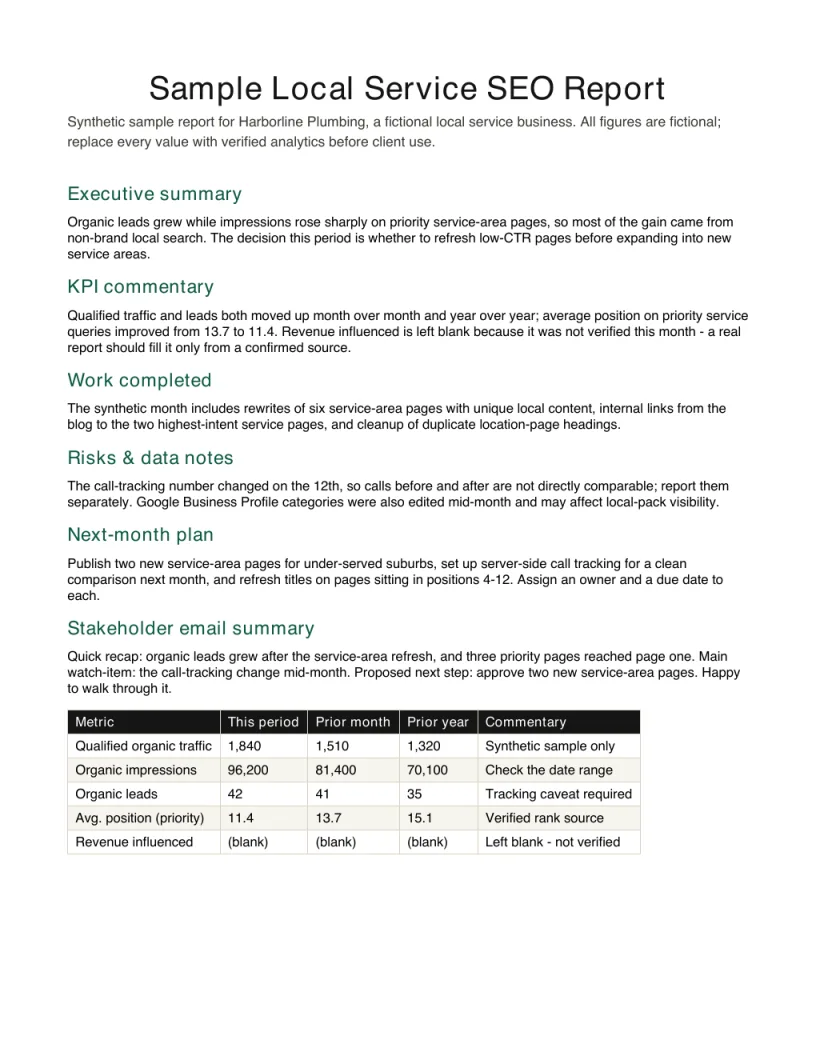
Inspect the finished report before downloading
The preview is the first page of the free PDF. Embed it with the source link intact when you reference this synthetic example.
View HTML embed code
<a href="https://seoreportkit.com/examples/local-service-seo-report/"><img src="https://seoreportkit.com/images/examples/sample-local-service-seo-report.webp" alt="First page preview of the synthetic local service SEO report example" width="612" height="792"></a><p>Source: <a href="https://seoreportkit.com/examples/local-service-seo-report/">SEO Report Kit</a></p>Attribution links to this report example.
Browse all SEO report examplesWhat This Local SEO Report Example Shows
This local SEO report example is built around Harborline Plumbing & Heating, a fictional plumbing and HVAC service business that works a single metro area. The report it produces is the monthly update a consultant would hand a local service client: not a wall of metrics, but a short read that explains whether the phone is more likely to ring this month and what should happen next. Every figure on the page is fictional sample data, used only to show what good commentary looks like once real exports are in place.
Local service SEO is different from the broader work covered by a general SEO report template, because the client does not care about traffic in the abstract. They care about leads from their service area, calls from their listing, and whether their service pages are being shown for the jobs they actually do. So this Sample local service SEO report leads with that outcome and treats rankings and impressions as the explanation, not the headline.
The KPIs tracked here are organic leads, call clicks, service-page impressions, and Google Business Profile views. Together they cover both halves of local search: the map and listing surface where people find a nearby business, and the website service pages they land on when they want detail before calling.
The Harborline Scenario And The Decision It Supports
Harborline serves a defined radius and bills by the job, so a single converted lead is worth far more than a visit that bounces. The owner does not want a report that celebrates a rankings gain on a keyword nobody books. They want to know one thing each month: should they keep paying for SEO, and what should they approve next. The report has to answer that without overstating what one month proves.
The scenario assumes two distinct channels feeding the same goal, and the report keeps them separate so a movement in one is not hidden by the other.
Because this is a service business with seasonality, the report also has to make room for context the numbers cannot supply on their own, such as a cold snap driving heating calls or a slow week after a holiday. That context belongs in the commentary, not buried in a chart.
- Google Business Profile and the map pack: profile views, the listing's call clicks, and visibility for nearby searchers who never reach the website.
- Organic service pages: impressions and clicks for pages like emergency repair and boiler installation, where searchers compare before they call.
- A shared outcome line: organic leads, counted the same way every month, so the client sees one honest number tied to both channels.
- Seasonal and operational context, recorded as notes, so a quiet or busy month is explained rather than spun.
Field Map
Every row in this report uses the same fields, so a busy month stays comparable to a quiet one and a second person can read it without a briefing. The map below explains what each field captures and how to fill it from your own verified exports rather than from estimates.
| Field | Purpose | How to use it |
|---|---|---|
| Google Business Profile actions | Calls, website clicks, direction requests, and other listing interactions. | Use the client's verified GBP export and state the reporting period; do not combine unlike action types into one unexplained total. |
| Map and local visibility | Tracks visibility for priority services across the real service area. | Keep the location, device, and method consistent, and report a grid or sampled observation as a dated view rather than a universal rank. |
| Service-page performance | Connects organic visibility to the pages that explain and convert each service. | Group by service line and pair Search Console evidence with verified calls or forms when tracking supports it. |
| Calls and lead quality | Separates raw contact volume from qualified enquiries and booked work. | Use the client's call-tracking or CRM definitions and disclose any change in qualification or attribution. |
| Reviews and listing changes | Records trust signals and implementation context that can affect local behavior. | Log review count or rating only from a dated verified source and note category, hours, or profile edits separately. |
| Owner and next action | Turns the local evidence into one accountable next step. | Assign the person who controls the page, listing, tracking, or response workflow and name the evidence expected next month. |
How To Read The Movements And Write The Commentary
Read the report from the outcome backward. Start with organic leads and call clicks, then use profile views and service-page impressions to explain why they moved. If leads rose while impressions were flat, the gain probably came from better conversion or a stronger listing, not from new visibility, and the commentary should say so. If impressions climbed but leads did not, you have an attention problem, not a ranking problem, and the next action points at the page rather than the keyword.
Keep movement and cause in separate sentences. In this sample, Harborline's heating service-page impressions trend up during a cold week while profile call clicks hold steady, which reads as seasonal demand finding existing pages rather than a durable improvement you can claim credit for. State the direction, then the most likely reason, then how confident you are. One month of local data is noisy, so write in terms of trend and plausibility, not proof. Treat positions just outside the local pack as opportunities to name, not as wins to bank.
The commentary should always end where the client can act. Tie each observation to one of the related resources you maintain, so the report is a decision document and not a status feed. The same discipline that drives a good SEO client report template applies here: explain what changed, why it matters, and what you want approved next.
- Lead the read with leads and call clicks; use impressions and profile views to explain, never to replace, the outcome.
- Separate the movement from its cause, and state how confident you are given one noisy month of local data.
- Flag seasonal demand explicitly, so a cold-snap bump is not mistaken for durable progress.
- Close every section with a next action the client can approve, such as a new service page or a review-request prompt.
Adapting It To A Real Client Without The Sample Numbers
Treat the Harborline figures as scaffolding and delete them before this becomes a live deliverable. Pull leads, call clicks, and impressions from your own verified sources, with profile views from Google Business Profile, search performance from Search Console, and on-site behavior from Analytics or Looker Studio. Where a number is genuinely unknown, leave the cell blank and say so in the notes rather than reaching for an estimate, because a single invented figure costs you the credibility of the whole report.
Adapt the structure to the client's real service lines and service area, not to the fictional one. A roofing company or an electrician needs the same skeleton with different service pages and a different seasonal rhythm, and the same field map carries over. When you want a more general monthly layout for a client who is not purely local, the SEO report for clients and GSC SEO report resources on this site cover the broader version without the map-pack and call-tracking emphasis.
Before sending, run the same honesty checks you would on any client work.
- Replace all sample figures with verified exports; confirm leads and call clicks are counted the same way as last month.
- Leave unknown values blank with a note, never an estimate, and never invent volume, difficulty, or ranking numbers.
- Keep the commentary tied to action, so the client can approve next steps without reading every table.
- Use your own exports as the only source; do not paste screenshots of any provider's dashboard into the report.
Local SEO report example and template FAQ
What should a local SEO report actually include?
For a local service business, lead with the outcomes that affect bookings: organic leads, call clicks, Google Business Profile views, and service-page impressions and clicks. Pair each movement with a short commentary that explains the likely cause and your confidence in it, then end with the next action the client should approve. Raw keyword tables belong in an appendix, not at the top.
Are the numbers in this local SEO report example real?
No. Every figure tied to Harborline Plumbing & Heating is fictional sample data, used only to show how the commentary and field map work. When you adapt the report for a real client, you replace all of it with your own verified exports from Search Console, Analytics, Looker Studio, and Google Business Profile, and you leave unknown values blank rather than estimating them.
How is a local SEO report different from a regular SEO report?
A local report adds the map and listing surface, so it tracks Google Business Profile views and the call clicks that come straight from the listing alongside ordinary website performance. It also weights leads and calls over raw traffic, because a local service client cares about jobs in their service area, not visits from outside it. The general SEO report template on this site covers the non-local version of the same structure.
How do I show progress when one month of local data is so noisy?
Write in terms of trend and plausibility rather than proof. State the direction a metric moved, the most likely reason, and how confident you are, and flag anything seasonal such as a cold snap driving heating calls. Avoid claiming credit for a single month of movement, and let two or three months of the same direction be what you point to as real progress.
Can I reuse this example as a template for my own clients?
Yes. The structure, field map, and commentary style are original and meant to be adapted. Strip out the fictional Harborline figures, swap in the client's real service lines and service area, and connect it to the SEO client report template and SEO report for clients resources here if you also need a more general monthly layout for non-local accounts.