SaaS SEO report example
This SaaS SEO report example shows how to tie rankings, content-assisted pipeline, trial intent, and technical fixes into a clear, client-ready template.
Original, synthetic sample data only. Every figure in this asset is a worked example — replace each sample value with your own verified analytics before sending a client report.
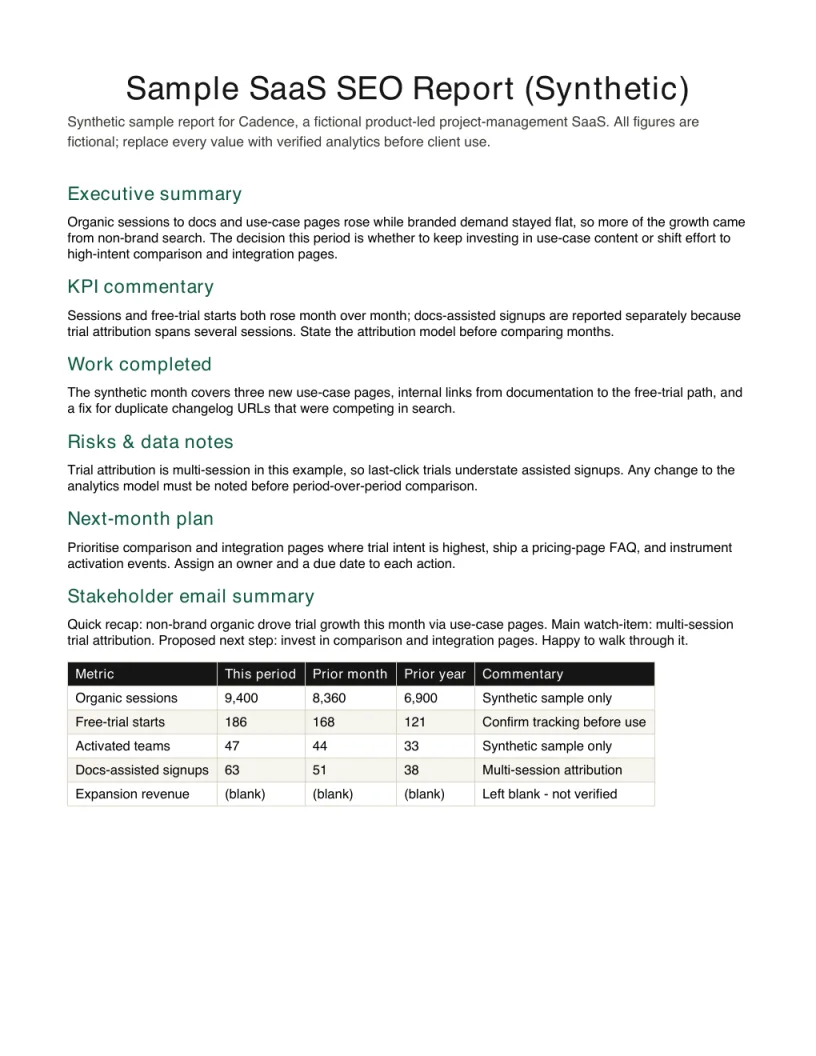
Inspect the finished report before downloading
The preview is the first page of the free PDF. Embed it with the source link intact when you reference this synthetic example.
View HTML embed code
<a href="https://seoreportkit.com/examples/saas-seo-report/"><img src="https://seoreportkit.com/images/examples/sample-saas-seo-report.webp" alt="First page preview of the synthetic SaaS SEO report example" width="612" height="792"></a><p>Source: <a href="https://seoreportkit.com/examples/saas-seo-report/">SEO Report Kit</a></p>Attribution links to this report example.
Browse all SEO report examplesWhat This SaaS SEO Report Example Shows
This SaaS SEO report example is built around a fictional product called Cadence, a product-led project-management tool that sells itself through a free trial rather than a sales team. Because the business grows when strangers find the product, start a trial, and get a team activated inside it, the report cannot stop at rankings and sessions. It has to connect what organic search did to what the product actually needs: trials that turn into working teams. Every figure here is fictional sample data, included only to show the shape of the commentary, not to suggest a typical result.
The point of a product-led SaaS report is to show the part of the funnel that SEO can plausibly move and to be honest about where its influence ends. Cadence's marketing pages can earn a visit and a free-trial start; whether a team activates depends on onboarding and the product, which is not your work. So this sample keeps two questions separate: did qualified search demand grow, and did the content that supports trial intent and documentation do its job. If you also maintain a recurring client deliverable, the patterns here line up with the SEO client report template and the broader SEO report template on this site.
The Cadence Scenario
Cadence runs a marketing site, a blog covering project-management workflows, a set of product and comparison pages, and a public documentation area that ranks for how-to and integration queries. Search is one of several channels, so the report has to isolate organic from paid and direct before anyone reads anything into a movement. The reporting period covers a quarter in which the team shipped new comparison pages, rewrote two high-intent product pages, and fixed a render issue that was hiding content on the docs templates.
The decision the report must support is concrete: should Cadence keep funding the documentation content track, or move that effort to more top-of-funnel blog posts. That is a budget question, and it cannot be answered with sessions alone. It needs the assisted-signup view, because docs pages rarely convert on the first visit but often appear earlier in the path that ends in a trial.
- Primary KPIs: organic sessions, free-trial starts, activated teams, and docs-page assisted signups, each pulled from a verified analytics export rather than estimated.
- Surfaces in scope: blog, product and comparison pages, and the public docs area, kept separate so a docs win is not credited to the blog.
- Out of scope as a goal: activation rate inside the product, which the report shows for context but does not claim as an SEO outcome.
- The open question: fund documentation content, or shift to top-of-funnel posts.
Field Map
The Synthetic report sample uses a fixed set of fields so each KPI carries its source, its movement, a one-line interpretation, and the work it is tied to. The map below explains what belongs in each field and how to fill it without turning a product-led report into a generic traffic dump.
| Field | Purpose | How to use it |
|---|---|---|
| Synthetic business profile | Shows a realistic reporting context without exposing a real client. | Replace the fictional profile with your client's market, services, and conversion path. |
| KPI narrative | Demonstrates how to explain movement rather than listing every metric. | Keep the sentence structure, but use your verified analytics and search data. |
| Action plan | Turns the example into a monthly or audit roadmap. | Adapt owners, dates, and dependencies to the engagement. |
| Risk notes | Shows where uncertainty belongs in a report. | Call out missing tracking, incomplete data, or implementation blockers. |
Reading The Movements And Writing The Commentary
Read the funnel top to bottom, but write the commentary around the gaps between stages. In the Cadence sample, organic sessions to the docs area rose after the render fix, and docs-page assisted signups rose with them, while direct trial starts from those pages stayed roughly flat. The honest reading is that documentation content is doing assisting work earlier in the path, not closing trials by itself, and that is exactly the evidence the budget decision needs. Write that as one sentence per movement: what changed, the most likely cause, and what it means for the question on the table.
Resist two tempting mistakes. The first is crediting a ranking improvement to your content when a technical fix is the more plausible cause; in this sample the render fix is the simpler explanation for the docs lift, so the commentary says so. The second is treating activated teams as an SEO metric. Activation moved a little in the sample, but the report frames it as downstream context, because attributing product activation to a comparison-page rewrite would not survive scrutiny. The commentary that earns trust is the one that names what your work can and cannot have caused.
- Tie each movement to a specific shipped change, or label it as untied and likely external.
- Use the assisted-signup field to defend content that does not convert on first visit, like docs and comparison pages.
- State direction and meaning in plain language before any number, so the report survives even where a figure is missing.
- Keep activation as context, not as a claimed result, when the lever sits inside the product.
Adapting It To A Real Client
Treat every number in this example as a placeholder. The Cadence figures are fictional sample data chosen to make the commentary legible, so the first step in reuse is to delete them and paste your own verified exports from analytics and Search Console in their place. If a value is unavailable for a period, leave it blank rather than estimating it; an empty cell is honest and a guessed one quietly becomes a claim you cannot defend later.
Then adapt the structure to the client's actual funnel. A self-serve SaaS with a free trial maps cleanly onto this sample, but a sales-led product will want pipeline-influenced or demo-request fields instead of activated teams, and the assisted view should point at whatever the real product treats as the early signal. Keep the discipline of separating verified KPI movement from interpretation, and keep the next-actions tied to the decision the client is being asked to make. For recurring delivery, pair this example with the SEO report for clients guidance and the monthly SEO report KPIs reference so the metrics you carry forward stay stable from one period to the next.
SaaS SEO report example FAQ
What makes a SaaS SEO report different from a normal SEO report?
A SaaS report has to follow demand past the visit into the product funnel, because rankings and sessions do not pay for the channel on their own. For a product-led tool like the Cadence sample, that means reporting free-trial starts and assisted signups alongside traffic, and being explicit about where SEO's influence ends and onboarding or the product takes over. A generic report can stop at sessions and conversions; a SaaS report has to connect content to trial intent and be honest about attribution.
Why does this example separate trial starts from activated teams?
Because they sit on different sides of the line that SEO can move. Organic search and the content around it can plausibly earn a free-trial start, but whether a team activates depends on onboarding and the product itself, which is not your work. The sample shows activated teams for context so the client sees the whole funnel, but it never claims that an SEO change caused activation, which keeps the report credible when activation moves for product reasons.
What are docs-page assisted signups and why track them?
Assisted signups are trials where a documentation page appeared earlier in the path but was not the final step. Docs pages rank for how-to and integration queries and rarely convert on the first visit, so a last-click view makes them look worthless. The assisted field is what lets you defend a documentation content track, which in the Cadence example is the exact budget decision the report has to support.
Can I reuse the numbers in this example for my own report?
No. Every figure in the Synthetic report sample is fictional sample data, chosen only to show how the commentary reads. Delete them, paste your own verified exports from analytics and Search Console, and leave any unavailable value blank rather than estimating it. The structure is reusable; the numbers are not.
How do I adapt this for a sales-led SaaS instead of a free trial?
Keep the funnel idea but swap the bottom fields. A sales-led product usually reports demo requests, marketing-qualified leads, or pipeline influence in place of free-trial starts and activated teams. Point the assisted view at whatever the business treats as the early signal in the buying path, and keep the same discipline of separating verified movement from interpretation so the report still answers a real decision.