Blog SEO report example
A free blog SEO report example for content teams: track topic clusters, content decay, internal links, and refresh priorities with sample data. Copy it today.
Original, synthetic sample data only. Every figure in this asset is a worked example — replace each sample value with your own verified analytics before sending a client report.
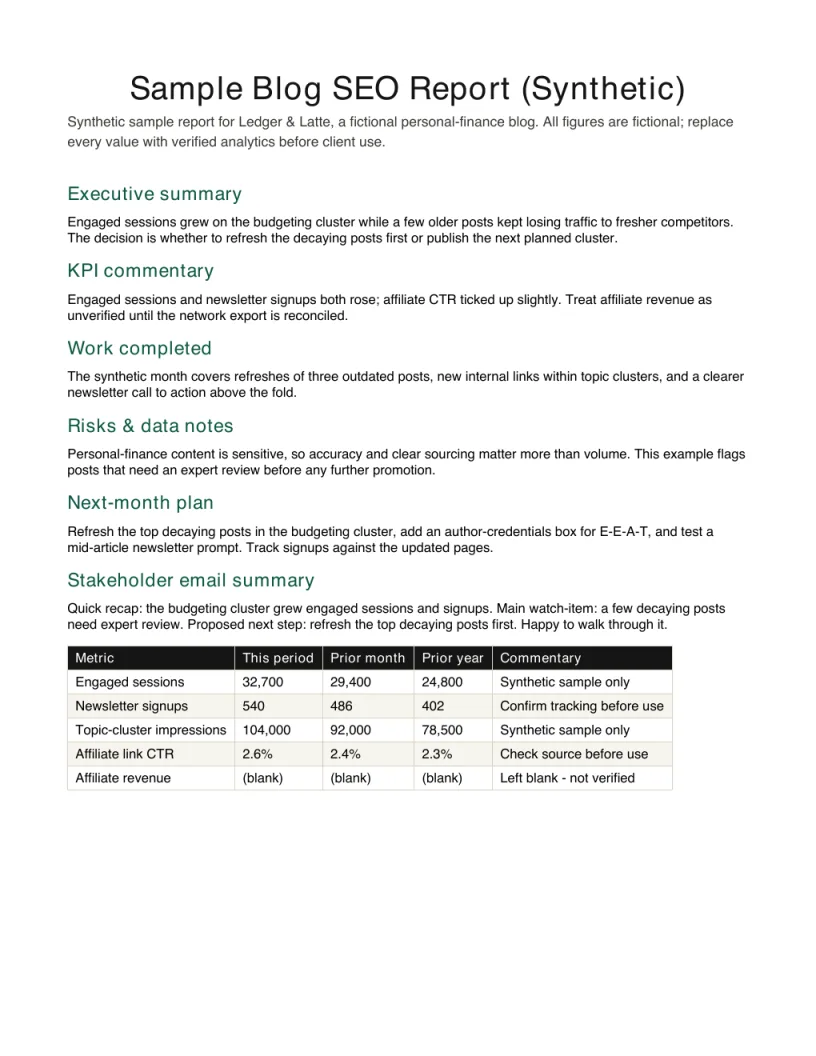
Inspect the finished report before downloading
The preview is the first page of the free PDF. Embed it with the source link intact when you reference this synthetic example.
View HTML embed code
<a href="https://seoreportkit.com/examples/blog-seo-report/"><img src="https://seoreportkit.com/images/examples/sample-blog-seo-report.webp" alt="First page preview of the synthetic blog SEO report example" width="612" height="792"></a><p>Source: <a href="https://seoreportkit.com/examples/blog-seo-report/">SEO Report Kit</a></p>Attribution links to this report example.
Browse all SEO report examplesWhat This Blog SEO Report Example Shows
This is a worked blog SEO report example built around Ledger & Latte, a fictional personal-finance blog that publishes explainers on budgeting, index funds, and credit cards. The report it produces is not a general site audit. It is the monthly content update an in-house writer or a freelance consultant would send to whoever owns the blog, and its job is to answer one question: is the published content earning more qualified organic attention than it did last month, and where should the next few hours of work go.
Everything below uses the Synthetic blog report notes that ship with this page. All figures are fictional sample data invented to make the structure concrete - none of it is real traffic, real ranking data, or a benchmark you should quote to a client. The point is to see how a blog-focused report is shaped differently from a generic one, because a content blog lives or dies on topic clusters, decay, and internal links rather than on a single landing page converting.
A blog report has a specific rhythm. Recent posts are still climbing, older posts are quietly decaying, and a handful of pages carry most of the organic value. The example shows how to surface those three groups separately so the commentary stays honest about what is working and what is slipping.
- Recent posts: published in the last quarter, still gaining or losing momentum as they settle
- Steady earners: older posts that pull qualified organic traffic month after month and deserve protection
- Decay candidates: posts that ranked well once and are sliding, marked for a refresh decision
- Cluster gaps: topics where you have one post but readers and search demand point to several
The Ledger and Latte Situation
Ledger & Latte makes money two ways that the report has to respect at once. It runs display ads against general traffic, and it earns affiliate commissions when readers click through to a budgeting app or a brokerage from comparison posts. That mix means a spike in low-intent traffic to a viral explainer is not the same win as a smaller rise in readers landing on the credit-card comparison cluster, even if the second group is smaller. The report has to make that distinction visible instead of celebrating raw sessions.
The owner is a solo founder who writes most of the posts and has limited time for production. The decision the report supports each month is therefore narrow and real: which single cluster gets the next batch of writing, and which two or three older posts get refreshed before they slide further. Tracked KPIs are engaged sessions, newsletter signups, topic-cluster impressions, and affiliate-link click-through - chosen because each one maps to a lever the founder can actually pull, not because they are easy to export.
Because attention is scarce, the report deliberately avoids handing over a long list of everything that moved. It ranks decisions, not metrics.
How the Report Is Structured
The field map below is rendered automatically from the Synthetic blog report notes, so you can see exactly which columns the example tracks and what each one is for. Read it as a starting layout to adapt, not a fixed schema - a finance blog watches affiliate click-through, while a recipe or travel blog would swap that for whatever action carries its value.
| Field | Purpose | How to use it |
|---|---|---|
| Synthetic business profile | Shows a realistic reporting context without exposing a real client. | Replace the fictional profile with your client's market, services, and conversion path. |
| KPI narrative | Demonstrates how to explain movement rather than listing every metric. | Keep the sentence structure, but use your verified analytics and search data. |
| Action plan | Turns the example into a monthly or audit roadmap. | Adapt owners, dates, and dependencies to the engagement. |
| Risk notes | Shows where uncertainty belongs in a report. | Call out missing tracking, incomplete data, or implementation blockers. |
Reading the Movements and Writing the Commentary
The numbers in the example are direction, not destination. When engaged sessions rise but newsletter signups are flat, the commentary should say the traffic is real but not converting to owned audience, and propose where to add a signup prompt rather than declaring victory. When a steady earner's impressions for its topic cluster drift down while its position holds just outside the top results, that is early decay, and the note should flag it as a refresh candidate before the traffic actually falls. The skill is connecting two columns into one sentence the founder can act on.
Write the commentary in plain language tied to the KPIs the founder cares about. For Ledger & Latte that means saying, in the sample report, that the index-fund cluster gained topic-cluster impressions after a new post linked back to the older pillar, so internal linking - not new content - drove the lift. That kind of attribution tells the founder to keep wiring clusters together rather than always writing from scratch. The Monthly SEO report KPIs resource on this site goes deeper on choosing which signals to commit to and how to keep them stable month over month.
End the interpretation with a short, ranked next-actions list, because a blog report that does not tell the owner what to do next has only described the past.
- Rising sessions, flat signups: traffic works, capture is the gap - test a stronger signup placement
- Cluster impressions up after an internal link: protect and repeat the linking, hold new writing
- Steady earner losing impressions while position holds: refresh now, before traffic follows
- Affiliate click-through up on one comparison post: build the rest of that cluster next
Adapting This to a Real Blog
To use this on a real client, throw away every number in the example and keep only the structure. The synthetic figures exist to show shape; reusing them would be presenting fiction as performance, which destroys trust the first time the client cross-checks their own dashboard. Replace each value with your own verified exports - engaged sessions and signups from Analytics, impressions and positions from Search Console, and any cluster or competitive view from Looker Studio or Semrush that you pulled yourself.
Then adapt the columns to the blog's actual business. A finance blog tracks affiliate click-through; a B2B blog might track demo requests, and a hobby blog might track ad-friendly engaged time. Keep the three-group split of recent posts, steady earners, and decay candidates, because that structure holds for almost any content site. If you are assembling the underlying data, the Google Search Console opportunity sheet and the broader SEO report template on this site give you the export-and-organize steps that feed this kind of report.
Finally, hold the report to one decision per cluster. The founder who reads it should finish knowing what to write next and what to refresh, not drowning in a table they cannot prioritize.
Blog SEO report example FAQ
What is a blog SEO report example actually for?
It is a worked sample that shows how a content blog's monthly report is structured, using a fictional business so the layout is concrete without exposing anyone's real data. You use it to copy the shape - which groups of posts to track and which KPIs to report - then fill it with your own verified numbers. The example here is built on a finance blog so the affiliate and ad mix is visible, but the structure adapts to any blog.
Are the numbers in this example real?
No. Every figure comes from the Synthetic blog report notes and is fictional sample data invented to illustrate the structure. None of it is real traffic, real rankings, or a benchmark, and you should never quote it to a client. Replace all of it with your own exports from Analytics, Search Console, Looker Studio, or Semrush before sending anything.
How is a blog SEO report different from a normal SEO report?
A blog report is organized around content rather than a single landing page or campaign. It separates recent posts, steady earners, and decay candidates, and it pays close attention to topic clusters and internal links because those are how blog traffic grows. A general report often centers on conversions or rankings for a fixed set of money pages instead.
Which KPIs should a blog report track?
Track only metrics that map to a lever the owner can pull. The Ledger & Latte example uses engaged sessions, newsletter signups, topic-cluster impressions, and affiliate-link click-through, because each one points to a clear next action. For a deeper walk through choosing and stabilizing these, see the Monthly SEO report KPIs resource on this site.
How do I turn this example into a report for my own client?
Keep the structure and the three-group split, then replace the columns with KPIs that match the client's business and fill them with your own verified exports. Pair it with the SEO report template and the Google Search Console opportunity sheet on this site to gather and organize the underlying data. Aim to end every section with a ranked next-action so the report drives a decision rather than just describing the past.